

I have been doing content writing for the last 8 years, and I never publish an article without running it through the writing tools. It helps me find the mistakes that we cannot see otherwise.
If you’re confused about which platform to choose for reviewing your written content, this article provides a detailed comparison between two of the most renowned tools. “Grammarly and ProWritingAid”.
I have been using these tools for the past several years as a writer. These tools are a part of my writing, which makes my work easier and helps me avoid errors.
This is why I consider myself the right person to guide you on which tool you should go for.
Table of Contents
Let’s look at the quick comparison below:
| Features | Grammarly | ProWritingAid |
| Pricing | Its pro plan starts from $30 monthly, and the annual plan offers you $12 monthly | Its premium plans start with $30 per month, and Premium Pro is $36 per month |
| Interface | User-friendly and clear | Easy to use, but a bit cluttered and confusing |
| Customer Support | Chatbox and Support Ticket | Chatbox and FAQs |
| Free Limitations | Unlimited | 500 words at a time and 10 rephrases |
| Report | ⭐⭐⭐⭐⭐ | ⭐⭐⭐⭐ |
| Plagiarism Checker | ✅ | ✅ |
| Multilingual support | Yes(Spanish,French,Portuguese,German and Italian) | ❌Only Supports English |
| Feedback & Suggestions | ✅ | ✅ |
| Browser Extension | Chrome, Safari, Firefox, Microsoft Edge | Chrome, Firefox, and Microsoft Edge |
| Integration | Microsoft office, Apple mail, Gmail, Google docs, etc. | Google Chrome, MS Office, Gmail, etc. |
| Mobile Support | ✅Yes | ❌No |
Let’s discuss both of their features one by one in detail:
First, we’ll discuss the very first thing that appears on the screen when we open the tool, i.e., its interface.
User Interface: Grammarly vs ProWritingAid
In my opinion, the interface of Grammarly is clear and easy to use. Even a beginner will not face any problem in understanding the use of Grammarly.
Grammarly’s Interface:
You can simply write and even copy-paste the written context, and it automatically starts scanning for errors and grammatical mistakes.
Providing the suggestions at the same time. You will notice the interface is not hard to understand. All the tools are right in front of the eyes. Hence, Grammarly provides a user-friendly interface.

ProWritingAid Interface:
When I used ProWriting Aid, it provided a clean and simple interface, though it might appear a bit cluttered to new users. You might find it a bit difficult to search for the tools, but with practice, it will give you handy options to use. It does provide the suggestions column.
The starting interface presents you with the recent work and documents. Hence, I can say ProWriting provides a moderate interface.

My Verdict: Both tools provide a clean and simple interface, but if you are a beginner, ProWritingAid might be a little complex to understand. Thus, Grammarly takes the lead in the Interface.
Free Plans (Grammarly v/s ProWritingAid)
Let’s understand what each tool offers in its free plan and what suits best for you best
Grammarly Free plans:
One of the best things that I noticed is that their free plans have no limit. You can use their free plans as much as you want, as they provide unlimited access.
- In their free plans, they offer you a grammar checker, tone suggester, and help in generating 100 AI prompts.
- I liked their colour-coded system; even in their free plan, they highlight the error with variant colours(red underline for spelling and punctuation mistakes, blue for improving your texts).
- Not just grammatical mistakes, but you can also check your writing tone in their free plan, so that the message you convey to your audience fits well.
- It doesn’t store or sell your data; rather, it keeps it safe and secure.
ProWritingAid Free Plans:
In comparison to Grammarly, it lacks offering free plans; it does offer free plans, but its free plans are very restricted in terms of free limits.
- They offer you grammar checking for only 500 words per session, 10 rephrases daily. .so, if you write daily, this might not be a good option for you.
- If you work on a report, there is only a limit of 2 reports to check in a day.
- What I like the most is that the ProWritingAid AI tools available in the free plan, although with limitations, you can use them.
My Verdict: Grammarly's free plan is best if you're a student or a beginner; you will get unlimited access to essential tools and features in the free plan itself.
Advance AI Features: Grammarly v/s Prowritingaid
Grammarly has recently launched some new AI tools, which are designed to support you throughout your writing process. It is called Superhuman.
AI Grader:
If you are a student, it improves your writing by giving you instant feedback on what you’ve written and grading your work in advance based on its analysis.
For example, suppose you want to analyze your assignment after preparing it so that you get an estimate of the grades and any suggestions, if any, in advance, so that you can submit the final paper with confidence.


Citation Finder:
In your academics, citations are a must, whether you prepare a report or a dissertation. For example, when I scanned the document, Grammarly generated citations to back up the claimed sources that we had to cite.

Reader Reactions:
I used this tool to analyze my content to determine what the first reaction of the audience would be, and it gives me relevant suggestions and questions that might arise.
It first asked me to choose the targeted audience, and then the suggestions were given accordingly, as shown in the image.


Humanizer:
Here I adjust the tone to give a human touch to my content by using the Humanizer tool. I have shown the process and result through images.


For example, you have to write an essay on “ Water Pollution”, you just copy and paste that essay from any source and rewrite it with Humanizer, which makes it sound naturally human-written.
Proofreader:
As a professional writer( writing blogs, articles, or SEO conten),) It is useful for you, as it helps you to review your content, ensuring there are no grammatical mistakes and your content is clear with the intent before publishing it.

Paraphraser:
Rewrite your content, aligning with the right tone and vocabulary.
For example, I chose the professional writing style to change the sentence tone, and the paraphrasing tool suggested a professional sentence, which I have shown in the image.


AI Detector:
It scans the whole document and highlights the AI-generated text to make sure that your document doesn’t contain any AI-based content.

Plagiarism Checker:
It keeps your content authentic and unique and ensures that your content is not copied or rephrased from any other sources.

ProWritingAid is an AI-powered Writing tool. It uses generative AI for the following features to improve your writing and gives a facility to turn off. Let’s see AI drive the tools of ProWritingAid.
Sparks:
You can use Sparks by selecting the sentence, and it provides editing options such as expanding, shortening, readability, 1st person, 3rd person, past, present, and present tense, etc., and even provides instant ideas with inspire options that show emotion, emphasis, joke, etc., styles. With all types of creative ideas.
Chapter Critique:
It provides a detailed report to writers regarding strengths, feedback for improvement, and a conclusion.

For example, if you are a writer and want an overall report for your documents, it will provide paragraph-wise details with feedback and improvement suggestions, with a conclusion.
Manuscript Analysis:
You will be provided a detailed report that scans your content for story, narrative, and themes.

For example, suppose you are a storyteller, manuscript analysis suggests more than 4000 words to be written, and it will scan your story plot, outline, characters, back storyline, theme, etc. Competitor landscape and character are a paid version.

Virtual Beta Reader:
Here, you will see that your story from a reader’s perspective is the work of a virtual beta reader. It becomes your first virtual reader and enhances your story’s interesting lines and readability by providing actionable feedback.
Rephrase:
ProWritingAid uses AI in rephrasing and rewriting your content to make it more creative, along with style improvements. I used the Rephraser and Paraphraser both and noticed that it gives multiple suggestions for a single sentence.


Plagiarism Checker:
It detects plagiarism in your stories or any kind of academic paper through its database. I used a plagiarism checker, and it did find the exact source.

My Verdict: Grammarly is taking the lead as it provides a wide variety of AI tools compared to ProWritingAid.
Find The Plan That Best Suits Your Needs
Free plans of both the tools are fine, but for advanced users, we recommend opting for paid versions.
Let’s discuss the premium plans of both of these tools:
Grammarly
It has mainly 3 plans, such as Basic, Pro, and Enterprise:
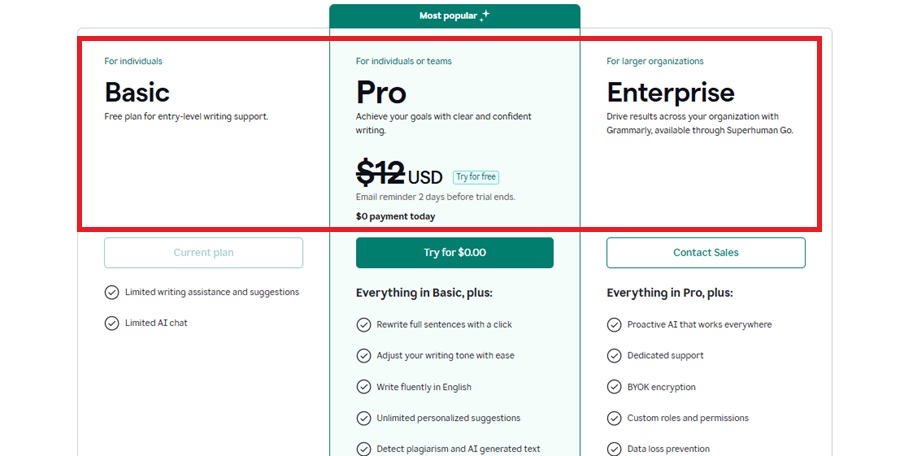
Basic Plan (Free Plan)
It’s an entry-level free plan that supports beginners, students, and new users to use Grammarly for an unlimited time. Talking about the free plan, they offer basic grammar checkers and limited AI chat, but if you are an advanced user and have more traffic on your site, you can go for their premium plans.
Pro Plan
This plan is for both the individual and the team. If you know that the premium plan and business plan have been replaced by the Pro plan, that means it includes both plan features in one plan.
| Pro Plan | Pricing |
| Monthly | $30/month |
| Quarterly | $20/month, total billed $60/quarter |
| Annual | $12/month, total billed $144/year |
What they offer in their premium plans:
- You can rewrite your sentences with only a click. If you’re someone who writes daily, your work gets easier.
- You can adjust your writing tone easily so it is clear and conveys your information more conveniently
- It not only includes grammar checkers in their premium plans but also includes Plagiarism Checker, AI detector, and generate text 2000 AI prompts.
- See, an all-rounder, you get everything on only one platform.
- They give you a customized billing
- Knowledge share, analytics dashboard, and Knowledge Dashboard
That would be useful for you if you have a business or you have multiple sites that carry high traffic.
ProWritingAid
It basically has 2 plans:
| ProWritingAid Plan | Monthly | Lifetime |
| Premium | $30/month | $399 one time |
| Premium Pro | $36/month | $699 one time |

Premium
Let’s look into their premium plan:
Once you get into their premium plan, you get their unlimited features, and it’s cheaper than the Grammarly Premium Plan.
- Unlimited word count, report runs, and rephrases
- You can customize your own style guide however you want, for the outcome of your article.
- More than 25 writing analysis reports
- And even citations for your sourced research and article
Premium Pro
In their pro plan, you get all that is offered in the premium plan, and their plan even offers you a 3-day money-back guarantee
- 50 sparks per day
- 3 Chapter Critiques per day
And look at the image below for more of their features.

I found that there’s one thing that’s best if you’re finding something for the long run, they offer you their lifetime plan, and if the features they offer fit you best, you can buy their one-time plan and get lifetime access.

My Verdict: Both offer different features in their plans. As I can see, ProWritingAid doesn’t offer you a plagiarism checker; you have to buy a different plan for it, whereas it gets easy with Grammarly, as once you have a plan, you get everything in it.
So, if you’re looking for all these features for your writing, I would suggest Grammarly because it has everything you need, and you don’t have to buy an additional feature, and they justify their pricing by it.
And if you’re looking for a long run platform, ProWritingAid offers you their lifetime plan, which is a bit expensive, but if it aligns with your goal,s you can go for it.
Grammar Checker: Grammarly vs ProWritingAid
Let’s see which one stands out in the grammar checker
Grammarly Grammar Checker:
If I say Grammarly is specially designed for assisting in detecting grammatical errors, but it provides more. Simply write the text, and it shows the suggestions to correct the errors and improve the text.
It even identifies and corrects adverbs, punctuation, spellings, words, and phrases. And don’t get surprised if I say it’s absolutely free with unlimited access.
Also provides the tools for paraphrasing and plagiarism checkers. It’s accurate and provides suggestions for correction in a very short time.

ProWritingAid Grammar Checker:
I personally used the grammar checker of ProWritingAid, and it’s simple to use and gives feedback at the same time. With a limit of 500 words, 10 rephrases, and 3 AI sparks daily.
It corrects spelling errors, grammatical mistakes, such as adverbs, and punctuation.
But sometimes, while checking for grammatical errors, the suggestions make the sentence complex to understand and change the whole meaning. Also, while correcting it, it shows new errors. So I don’t say it very accurately in long sentences and paragraphs.

My Verdict: I noticed that for long paragraphs and sentences, Grammarly always performs much more accurately and simply rephrases the sentences.
Plagiarism Checker: Grammarly vs ProWritingAid
Which one is more accurate when detecting plagiarized content
Grammarly Plagiarism Checker:
As I noticed while working, Grammarly is an all-rounder tool, and its premium plan is only known for its plagiarism checker. If you are looking for a plagiarism checker from Grammarly, although it is a paid version, the pricing and features are still the best.
You simply have to click on the plagiarism button and just copy and paste the text, and it will search for your content in the billions of databases present on the internet.

I run the plagiarism checker on my documents, and it recommends the exact sources that I copied to show you the accuracy of Grammarly’s plagiarism checker. It informs you regarding the score of originality in your content.
It facilitates the different apps to search for plagiarism at your convenience. You can check in Grammarly, Google Docs, Microsoft Word, etc.
So, as per my take, Grammarly is a good source for plagiarism checkers, and if talking about accuracy, it has a decent performance.
ProWritingAid Plagiarism Checker:
You can check for alternative plagiarism checkers as ProWritingAid. It has its own capabilities. It checks for your content in a large database, including both online and offline, and checks for 2000 words.
It includes rephrasing, rewriting, and even facilitates citation.

You just have to copy and paste your text, and it will search for similar content in the large stored database, both online and offline. It detects plagiarism with a source of copying and hence provides a report on the plagiarism.
Still, sometimes the performance-based accuracy may differ.
My Verdict: Both have their own capabilities and features, but still, as per my take, Grammarly runs smoothly and with much accuracy.
Tone Detector: Grammarly vs ProWritingAid
To ensure your tone aligns with your intent and style, let’s see which one is the most reliable
Grammarly Tone Checker:
According to me, one of the advanced and useful features is the tone adjuster. If you are a writer but sometimes find it hard to express, here comes the role of the tone detector. It understands the intent of the writing and casually adjusts the wording of the context.


Grammarly tone checker simply analyses your writing pattern, wording, punctuation, etc., to adjust the tone and intent together and hence gives appropriate results.
Example: I uploaded the message and used a tone detector to set the tone in a confident and empathetic tone. Here tone detector gives options to adjust the pace and tone of wordings, and rephrase the whole content without changing the intent.
ProWritingAid Tone Checker:
ProWritingAid is especially designed for professional Emails. ProWritingAid doesn’t have a separate tone detector, but it sets the tone of the reports themselves. But make sure you have a text in the Email pattern, as the tone adjuster only supports the Email.


They offer over 25+ report styles. I have shown you one of them here, which is set to readability report. It rephrases your content in a readable tone.
It is shown in a score pattern and In critique tool with thumbs up and thumbs down emojis, where, if the intent is rightly analysed, it shows thumbs up and vice versa.
My Verdict: ProWritingAid and Grammarly here work well on their own pace. In my opinion, you can opt for whichever suits you the best.
Where Can You Run These Tools?
| Integration | Grammarly | ProWritingAid |
| Chrome | ✅ | ✅ |
| Safari | ✅ | ✅ |
| Ms Word | ✅ | ✅ |
| Google Docs | ✅ | ✅ |
| Gmail | ✅ | ✅ |
| Apple Mail | ✅ | ❌ |
| MS Office | ✅ | ✅ |
| Mobile APP | ✅ | ❌ |
As you can see, both have almost similar browser extensions and integration, but one thing that is a drawback is that ProWritingAid doesn’t offer you a mobile application, and if you have an IOS it doesn’t support Apple Mail.
That’s all I discovered in their browser extension, and as I can see, both of them offer almost the same integration except for the IOS system, and don’t support mobile apps.
Use Cases
Let’s discuss the use cases of both tools, which will clarify which tool you should go for.
Grammarly
For a Professional Writer:
- Adjust and detect your tone according to your content style and audience
- Refines your writing with a grammar checker that checks your content in-depth
- If you write SEO-based content, the plagiarism checker and AI Detector tool are the best suits for you.
For Beginners and Students:
- Its free version is sufficient for you; most of your things can be resolved in this version.
- Brings improvement in your grammar and vocabulary, and enhances overall writing quality
- user-friendly interface makes your learning easy.
ProWritingAid:
For a Professional Writer:
- Sparks, Manuscript analysis, Chapter critique, and virtual beta reader are tools that can be useful for the blog and creative writers, and even for research papers.
- If you want to detect your pace of words, and if you are confused about the same, here is a Tone Adjuster for help.
- If you lack creative ideas and adding a taste to your writing, here is an AI-driven tool named Sparks, which ignites your writing with styles like emotion, jokes, creative, etc.
For a Student
- If you are a student, you can check your reports for readability. As it will suggest to you the shortening of the length, overuse of the same works and score to analyse your assessment.
- If you want your work to be error-free Grammar checker is best for you as it will identify and correct your grammar, punctuation, and spelling.
- You can even use style reports with 25+ in-depth reports.
Why Choose Grammarly
- Grammarly facilitates you in continuation of the work as it supports the majorly used browsers, Google Chrome, Mozilla Firefox, Safari, and Microsoft Edge.
- It supports desktop apps and mobile apps as well. Like Windows and Mac for desktop apps, and Android, iPad, and iOS for mobile.
- It is an all-around tool that facilitates the whole writing process, such as grammar checking, paraphrasing, plagiarism checker, tone adjuster, proofreading, AI detector, etc., to help you in clear and perfect writing.
- If you have high traffic on your site and indulge in professional writing, then you can go for it.
Who to Choose ProWritingAid
- ProWritingAid facilitates you to work smoothly with all the supporting web browsers, such as Microsoft Word, Google Docs, and Scrivener.
- If you’re a storyteller or just a beginner who’s writing for personal use, you can use it, as it can clear up your basic grammatical mistakes.
- Provides you with the tools to use for professional writing, such as Grammar checker, paraphrasing tool, rephrase, manuscript analysis, a report, Sparks, virtual beta read, er and many more.
- As per my take, ProWritingAid is best for creative writers with a variety of writing styles and 25+ in-depth reports.
Final Verdict
Now that we have reached the end of the article, I would like to inform you that I have illustrated all the key features and used them myself in this article.
My effort is to provide a detailed comparison and provide a genuine result. And we can see that Grammarly is the all-in-one best writing tool, which is proficient in every feature
I hope this article has been able to clear up any doubts you may have. If you have any, please leave a comment.
FAQs
How many devices can you use Grammarly on?
You can connect up to 5 different devices to access Grammarly.
What languages does ProwritingAid offer?
ProWritingAid offers you only one language, i.e., English.
How many offers do you get with ProWritingAid?
In their free plans, they offer you 10 Rephrases per day, and if you buy their paid plans, they offer you Unlimited rephrases.
Can you upload documents to ProWritingAid and Grammarly?
Yes, you can upload your document to both Grammarly and ProWritingAid.
Do Grammarly and ProWritingAid work on Google Docs?
They both work on Google Docs; for that, you have to install their browser extension.
Is Grammarly better than ProWritingAid?
Both Grammarly and ProWritingAid have their own distinct strengths. Grammarly is best for basic errors and writing clarity, while ProWritingAid specializes in detailed analysis and storytelling.

About the Author:
Mrs. Sunny Gupta is the co-founder of a leading talent recruitment firm ecH-aaR Manpower Solutions.
She has worked with several leading brands as HR and helped them in scaling up their organizations.
She is an expert in career counselling, resume making, manpower planning and ERP.